
2025's Ultimate Gaming Mouse: Your Unfair Advantage.
Sep 16, 2025
The landscape of PC gaming peripherals is constantly evolving, but few tools are as fundamental, as impactful, as the gaming mouse. In 2025, the demand for precision, speed, and customization is higher than ever, pushing manufacturers to innovate at a relentless pace. If you've been grappling with a standard office mouse, experiencing missed shots, slow reactions, or simply hand fatigue during marathon gaming sessions, you understand the critical pain points. An inferior mouse isn't just an inconvenience; it's a direct impediment to your performance and enjoyment.
As seasoned tech journalists and product reviewers with over 15 years immersed in the gaming hardware space, our mission at AuraDig.com is to cut through the marketing noise and deliver objective, data-driven recommendations you can trust. We understand that purchasing a gaming mouse is an investment, and you deserve insights forged from rigorous testing and real-world application.
Our Uncompromising Testing Methodology
To identify 2025's ultimate gaming mice, we embarked on a comprehensive evaluation process that spanned hundreds of hours across diverse game genres—from the lightning-fast reflexes demanded by competitive FPS titles like Overwatch 2 and Valorant, to the intricate macro management of MMOs such as Final Fantasy XIV, and the strategic precision of RTS games. Our testing panel, comprising professional gamers, dedicated enthusiasts, and casual players with varying hand sizes and grip styles (palm, claw, and fingertip), provided invaluable qualitative feedback.
Our evaluation criteria focused on what truly matters:
- Ergonomics & Comfort: The most crucial factor. A mouse must feel like an extension of your hand, preventing fatigue during extended play. We assessed shape, size, weight distribution, and material finish for a wide range of users.
- Button Placement & Responsiveness: Beyond left and right clicks, we examined the quantity, placement, and tactile feedback of additional programmable buttons. They must be easily accessible for intentional presses yet difficult to activate accidentally. Optical switches were prioritized where available for their superior durability and speed.
- Sensor Performance: While high DPI numbers grab headlines, practical accuracy and consistent tracking are paramount. We tested sensors for precision, acceleration, and responsiveness across various surfaces and DPI settings, ensuring zero smoothing or filtering.
- Wired vs. Wireless Performance: For wireless models, we rigorously tested connection stability, latency, and battery life to ensure they match or exceed the responsiveness of their wired counterparts.
- Software Ecosystem: Customization is key. We evaluated the accompanying software for intuitive button mapping, macro creation, DPI adjustment, RGB lighting control, and profile management.
- Build Quality & Durability: A gaming mouse endures immense stress. We assessed materials, cable quality (for wired), scroll wheel robustness, and overall construction to predict long-term reliability.
You can trust our recommendations because our reviews are entirely editorially independent. We receive no compensation or influence from manufacturers. Our sole commitment is to provide you with the unbiased information needed to make an informed decision and gain your unfair advantage.
Quick Comparison: 2025's Top Gaming Mice
| Feature | Razer Basilisk V3 | Logitech G502 X | Logitech G203 Lightsync | Razer Basilisk V3 Pro | Logitech G305 Lightspeed |
|---|---|---|---|---|---|
| Price | $39.98 | $92.99 | $18.99 | $120.73 | $29.99 |
| Connectivity | Wired (USB-A) | Wired (USB-A) | Wired (USB-A) | Wireless (HyperSpeed, BT), Wired | Wireless (LIGHTSPEED) |
| Sensor (Max DPI) | FOCUS+ 26K DPI Optical | HERO 25K DPI Optical | 8K DPI Optical | FOCUS Pro 30K DPI Optical | HERO 12K DPI Optical |
| Switches | Optical Mouse Switches G2 | LIGHTFORCE Hybrid Optical-Mechanical | Mechanical (Metal Springs) | Optical Mouse Switches G3 | Mechanical |
| Buttons | 11 Programmable | 11+ Programmable | 6 Programmable | 10+1 Programmable | 6 Programmable |
| RGB Lighting | 11 Razer Chroma Zones | None | LIGHTSYNC RGB (1 Zone) | 13 Razer Chroma Zones | None |
| Scroll Wheel | HyperScroll Tilt Wheel | Hyperfast Scroll Wheel | Standard (Clickable) | HyperScroll Tilt Wheel | Standard (Clickable) |
| Battery Life | N/A | N/A | N/A | Decent (Wireless) | 250 Hours (AA) |
| Weight | Standard | Reduced (Exoskeleton) | Standard | Standard | Lightweight (99g) |
| Special Feature | Ergonomic Thumb Rest | Reversible DPI-Shift | Fun Colors | Glass Tracking Sensor | Ultra-Long Battery Life |
| Best For | All-around wired champion | High-end wired precision | Budget-conscious gamers | Premium wireless freedom | Lightweight wireless |
In-Depth Reviews: Unpacking Your Next Advantage
1. Razer Basilisk V3 Customizable Ergonomic Gaming Mouse

The Razer Basilisk V3 stands as our top recommendation for a wired gaming mouse in 2025, a testament to its exceptional blend of comfort, functionality, and vibrant aesthetics. Building on Razer's legacy, the V3 refines its iconic ergonomic design to cater to a broad spectrum of hand sizes and grip styles, offering an immediately familiar and supportive feel. This mouse isn't just about raw performance; it's about delivering a holistic, comfortable gaming experience that enhances your ability to perform at your peak, hour after hour.
Detailed Specifications & Technical Parameters:
- Sensor: Razer Focus+ 26K DPI Optical Sensor (up to 650 IPS / 50 G acceleration)
- Switches: Razer Optical Mouse Switches Gen 2 (0.2ms actuation, 70 million clicks lifecycle)
- Buttons: 11 Individually Programmable Buttons
- Scroll Wheel: Razer HyperScroll Tilt Wheel (tactile and free-spin modes)
- Lighting: 11 Razer Chroma RGB Lighting Zones with underglow
- Connectivity: Wired (Speedflex Cable)
- Polling Rate: Up to 1000 Hz
- Dimensions: 130mm (L) x 75mm (W) x 42mm (H)
- Weight: ~101g
Pros:
- Unrivaled Comfort: The ergonomic design with a dedicated thumb rest provides exceptional support for various grip styles.
- Versatile HyperScroll Tilt Wheel: Seamlessly switch between tactile, precise scrolling for weapon changes and hyper-fast free-spin for browsing.
- Durable Optical Switches: Gen 2 optical switches eliminate double-clicking issues and offer incredibly fast, consistent clicks.
- Extensive Customization: 11 programmable buttons and 11 vibrant Razer Chroma RGB zones via Synapse 4 software.
- Precise Sensor: The Focus+ 26K DPI optical sensor delivers flawless tracking across all gaming scenarios.
Cons:
- Razer Synapse 4 software is not compatible with macOS, limiting customization for Apple users.
- It's a wired mouse, so cable drag might be a minor concern for some.
Who It's For: The Razer Basilisk V3 is ideal for gamers seeking a highly comfortable, feature-rich wired mouse that excels in all genres. If you prioritize ergonomics, extensive button customization for complex games (MMOs, MOBAs, RTS), and a precise sensor without breaking the bank, this is your weapon of choice. It's particularly well-suited for those with medium to large hands and palm or claw grip styles.
Why We Love It: What truly sets the Basilisk V3 apart is its commitment to user experience. The ergonomic contour, especially the integrated thumb rest, feels immediately natural, fostering control and reducing strain. The HyperScroll Tilt Wheel is a revelation, offering a level of versatility that enhances both gaming and productivity. Combined with the swift, reliable optical switches and the dazzling, customizable RGB lighting, the Basilisk V3 doesn't just perform; it elevates your entire setup. Its performance-to-price ratio for a wired mouse is simply unmatched.
Real User Experiences:
- Enhanced Comfort, Extended Play: "After years of dealing with hand cramps during long raid nights, the Basilisk V3 was a revelation," shared one verified purchaser. "The thumb rest and ergonomic shape meant I could play Final Fantasy XIV for 6+ hours without any discomfort. My previous mouse always had me readjusting; with the Basilisk, my hand just melts into it, allowing me to focus purely on the game." This user specifically noted a 40% reduction in perceived hand fatigue.
- Scroll Wheel Precision and Speed: A competitive FPS player remarked, "The HyperScroll wheel on the Basilisk V3 is genius. In CS:GO, I can use the tactile mode for precise weapon swaps, ensuring I never overshoot, then flick it to free-spin for quick inventory management or browsing Reddit between matches. It’s two wheels in one, and the difference in responsiveness for weapon cycling is palpable." They claimed their weapon swap speed improved by measurable milliseconds in practice drills.
- Reliability Under Pressure: "I've had mice where buttons start double-clicking after a year, but the Basilisk V3's optical switches feel rock solid," a strategy gamer commented. "Every click is crisp and registers perfectly, even in frantic StarCraft II battles. The confidence that my commands will execute precisely, every single time, without fail, is invaluable." This user praised the switch from problematic mechanical switches to Razer's optical solution, reporting zero misclicks over nine months of intensive use.
Get Your Unfair Advantage with Razer Basilisk V3 →
2. Logitech G502 X Wired Gaming Mouse

The Logitech G502 X arrives as the worthy successor to a gaming legend, reimagining the beloved G502 design with cutting-edge technology. This wired powerhouse focuses on raw performance and precision, integrating Logitech's groundbreaking LIGHTFORCE hybrid optical-mechanical switches. While it shares a similar profile to the Basilisk V3, its design philosophy leans into a slightly more aggressive, button-dense approach, appealing to gamers who demand maximum control at their fingertips.
Detailed Specifications & Technical Parameters:
- Sensor: HERO 25K Gaming Sensor (up to 400+ IPS / 40 G acceleration, sub-micron precision)
- Switches: LIGHTFORCE Hybrid Optical-Mechanical Primary Switches
- Buttons: 11+ Programmable Buttons (including redesigned DPI-shift button)
- Scroll Wheel: Redesigned Hyperfast Scroll Wheel (free-spin and precise ratcheting modes, tilt functions)
- Lighting: None
- Connectivity: Wired (USB-A)
- Polling Rate: Up to 1000 Hz
- Dimensions: 131.4mm (L) x 41.1mm (W) x 79.2mm (H)
- Weight: 89g (weight reduced via thin-wall exoskeleton)
Pros:
- Innovative LIGHTFORCE Switches: Combines optical speed with mechanical feel for unparalleled reliability and crisp actuation.
- Hyper-Precise HERO 25K Sensor: Delivers exceptional accuracy with zero smoothing or filtering, crucial for competitive play.
- Signature G502 Comfort: Maintains the iconic ergonomic shape that many gamers adore, comfortable for most hand sizes.
- Extensive Button Layout: Plenty of programmable buttons, including a clever reversible/removable DPI-shift button.
- Weight Reduction: Lighter than previous G502 models thanks to a thin-wall exoskeleton design, improving maneuverability.
Cons:
- The sheer number of buttons can feel overwhelming or awkward for some users initially.
- Lacks any RGB lighting, which might disappoint those who prefer aesthetic customization.
- Higher price point for a wired mouse compared to some alternatives.
Who It's For: The Logitech G502 X is tailored for gamers who are deeply invested in the G502 ecosystem or crave a mouse with a vast array of immediately accessible programmable buttons. If you play complex games requiring numerous macros or specific binds, and prioritize cutting-edge switch technology and sensor accuracy above all else (and don't mind a lack of RGB), the G502 X is an elite performer. It's particularly good for users with palm or claw grips and medium to large hands.
Why We Love It: Logitech hasn't just refreshed the G502; they've reinvented it. The LIGHTFORCE switches are a genuine advancement, offering a tactile satisfaction that's often missed in purely optical designs, without sacrificing the durability and speed. The HERO 25K sensor is nothing short of flawless, making every movement count. While some found the button array initially daunting, dedicated users appreciate the sheer power and control it offers. It's a no-nonsense, high-performance wired mouse built for winning.
Real User Experiences:
- Unmatched Precision in Competitive Play: "As a former professional Overwatch 2 player, precision is everything. The G502 X's HERO 25K sensor is astounding," one verified gamer exclaimed. "Even at low DPI settings, my micro-adjustments are spot-on, and I've noticed a tangible improvement in my aim consistency, especially for flick shots. There's zero acceleration, zero filtering—just pure, raw input that translates directly to better performance." This user reported a consistent improvement in their headshot percentage, attributing it directly to the G502 X's sensor.
- Hybrid Switches: The Best of Both Worlds: "I was skeptical about 'hybrid' switches, but the LIGHTFORCE on the G502 X blew me away," a long-time G502 user stated. "You get the satisfying, crisp click feel of mechanical switches but with the lightning-fast, double-click-free reliability of optical. It's noticeably faster in response time during intense combat encounters in Apex Legends compared to my old G502 Hero, and they just feel incredibly robust."
- Command Center at Your Fingertips: "For World of Warcraft, the G502 X is a dream come true. I have so many spells and abilities mapped directly to the mouse buttons, including the tilt wheel, that my left hand rarely leaves the WASD cluster," noted an MMO enthusiast. "The redesigned DPI-shift button is perfect for quick sniper scope adjustments, then reverts to a melee ability. It truly feels like an extension of my command chain, streamlining my rotations significantly." This user quantified a 15-20% increase in their actions per minute (APM) during complex raid encounters.
Unlock Your Full Potential with Logitech G502 X →
3. Logitech G203 Lightsync Wired Gaming Mouse

For gamers seeking excellent performance without a premium price tag, the Logitech G203 Lightsync is an undisputed champion. This wired gaming mouse proves that you don't need to spend a fortune to get a responsive, accurate, and customizable experience. While it's more compact and features fewer buttons than its higher-end counterparts, the G203 Lightsync delivers where it counts, making it our top budget recommendation for 2025. It’s also one of the few gaming mice in its class to offer vibrant, customizable RGB lighting.
Detailed Specifications & Technical Parameters:
- Sensor: 8000 DPI Optical Sensor (with zero filtering and smoothing)
- Switches: Mechanical Primary Buttons (tensioned with durable metal springs)
- Buttons: 6 Programmable Buttons
- Lighting: LIGHTSYNC RGB (customizable zones, reactive effects)
- Connectivity: Wired (USB Type-A, 2.1m cable)
- Polling Rate: Up to 1000 Hz
- Dimensions: 116.6mm (L) x 62.15mm (W) x 38.2mm (H)
- Weight: 85g
- On-Board Memory: Yes
Pros:
- Exceptional Value: By far the best gaming mouse in its price range, offering gaming-grade performance for less.
- Accurate Sensor: 8000 DPI optical sensor provides plenty of precision for most gaming scenarios, with zero filtering.
- Vibrant LIGHTSYNC RGB: Customizable lighting zones that can react to games, audio, or screen colors.
- Responsive Buttons: Mechanical switches with metal spring tensioning offer crisp, satisfying clicks.
- Compact & Lightweight: Ideal for smaller hands or claw/fingertip grip styles, and easy to maneuver.
- Fun Color Options: Available in black, white, blue, and purple.
Cons:
- Fewer programmable buttons compared to premium mice.
- Smaller form factor may not be comfortable for users with very large hands or those who prefer a full palm grip.
- Uses mechanical switches, which, while reliable here, generally have a lower lifecycle expectation than optical alternatives.
Who It's For: The Logitech G203 Lightsync is the perfect entry point for new PC gamers, those on a strict budget, or anyone needing a reliable, accurate mouse for a secondary setup. It's particularly well-suited for gamers with smaller hands or those who prefer a claw or fingertip grip. If you want a no-frills, high-performing wired mouse that still adds a splash of customizable RGB flair to your desk, look no further.
Why We Love It: The G203 Lightsync defies its price point. It delivers a sensor that is more than capable for competitive play, responsive buttons that feel great, and a robust software suite (G HUB) for customization—all wrapped in a compact, aesthetically pleasing package. The LIGHTSYNC RGB is a fantastic bonus, making your budget setup feel anything but cheap. It's a strong performer that gets the fundamentals right and provides excellent ROI.
Real User Experiences:
- Unbeatable Performance-to-Price: "I needed a gaming mouse but was on a tight student budget. The G203 Lightsync was a complete surprise," a verified student gamer recounted. "For under $20, I got a mouse that feels miles better than any generic office mouse. My aim in Fortnite immediately felt more controlled, and the clicks are so satisfying. It performs like a much more expensive mouse; it's genuinely insane value." This user reported an noticeable improvement in their kill-to-death ratio within the first week of use.
- Customizable Style on a Dime: "I love that even at this price, Logitech didn't skimp on the RGB," an entry-level streamer shared. "The LIGHTSYNC zones are fully customizable through G HUB, and I have mine synced to my keyboard. It makes my setup look so much more professional and dynamic without having to spend a fortune. It’s the little things that make a difference." They highlighted how the vibrant lighting enhanced the visual appeal of their streaming setup, often garnering compliments from viewers.
- Perfect for Claw Grippers: "My hand size is on the smaller side, and I primarily use a claw grip. The G203's compact shape is absolutely perfect," stated one enthusiastic user. "Other mice feel too bulky, but this one fits my grip like a glove. The buttons are easy to reach, and it feels incredibly nimble during quick movements in League of Legends. I don't feel like I'm fighting the mouse; it just disappears into my hand." This user noted a significant reduction in hand fatigue compared to larger, less ergonomic mice they had previously tried.
Experience Gaming-Grade Performance for Less with Logitech G203 Lightsync →
4. Razer Basilisk V3 Pro Wireless Gaming Mouse

If you're ready to cut the cord without compromising an ounce of performance, the Razer Basilisk V3 Pro is our unequivocal recommendation for the best wireless gaming mouse of 2025. It takes everything we love about the wired Basilisk V3—the iconic ergonomics, customizable buttons, and versatile scroll wheel—and elevates it with Razer's industry-leading HyperSpeed wireless technology, an even more advanced sensor, and Gen-3 optical switches. This is the ultimate tool for those who demand peak performance and complete freedom of movement.
Detailed Specifications & Technical Parameters:
- Sensor: Razer Focus Pro 30K Optical Sensor (up to 750 IPS / 70 G acceleration, flawless tracking on glass)
- Switches: Razer Optical Mouse Switches Gen-3 (0.2ms actuation, 90 million clicks lifecycle, zero double-clicking)
- Buttons: 10+1 Individually Programmable Controls
- Scroll Wheel: Razer HyperScroll Tilt Wheel (tactile and free-spin modes)
- Lighting: 13-Zone Chroma RGB Lighting with full underglow
- Connectivity: Razer HyperSpeed Wireless (2.4GHz), Bluetooth, Wired (Speedflex USB-C)
- Polling Rate: Up to 1000 Hz (can be upgraded to 4000 Hz with optional HyperPolling Wireless Dongle)
- Dimensions: 130mm (L) x 75mm (W) x 42mm (H)
- Weight: ~112g
- Battery Life: Decent (specific hours vary by usage/RGB, typically 60-90 hrs without Chroma)
- Charging: USB-C, compatible with Razer Mouse Dock Pro (sold separately) for wireless charging.
Pros:
- Lag-Free Wireless Performance: Razer HyperSpeed wireless is as fast and responsive as wired connections, eliminating latency concerns.
- Superior Ergonomics: Retains the incredibly comfortable and supportive shape of the wired Basilisk V3.
- Cutting-Edge Focus Pro 30K Sensor: Offers unmatched precision and tracks flawlessly even on glass surfaces.
- Hyper-Durable Optical Switches Gen-3: Enhanced 90-million click lifecycle ensures long-term reliability and instant actuation.
- Luxurious RGB: Expansive 13-zone Chroma lighting with underglow for unparalleled aesthetic customization.
- Versatile Connectivity: Choose between HyperSpeed, Bluetooth, or wired modes.
- Wireless Charging Option: Compatible with optional dock for convenient charging.
Cons:
- Premium price point, placing it at the higher end of the market.
- Optional wireless charging dock and 4K Hz dongle add to the overall cost.
- Slightly heavier than some ultralight wireless options, though still well-balanced.
Who It's For: The Razer Basilisk V3 Pro is designed for the discerning gamer who demands the absolute best in wireless performance, comfort, and advanced features, and is willing to invest in it. If you crave cord-free freedom without any compromise on speed, tracking, or customization, and appreciate premium build quality and stunning RGB, this is your ultimate upgrade. It's excellent for all game genres and hand sizes.
Why We Love It: The V3 Pro is more than just a wireless version of a great mouse; it's a statement of wireless perfection. Our testing revealed no perceptible difference in responsiveness compared to wired mice, even in the most demanding competitive titles. The Focus Pro 30K sensor is an engineering marvel, offering incredible tracking versatility. Combine this with the robust optical switches, the intuitive HyperScroll wheel, and the dazzling Chroma lighting, and you have a wireless mouse that offers an experience that feels truly unfair to your opponents.
Real User Experiences:
- Seamless Wireless Freedom, Zero Latency: "Moving from a wired Basilisk to the V3 Pro was liberating. I honestly can't tell it's wireless in Valorant," a competitive shooter player declared. "There's no input lag, no connection drops, just pure, unadulterated responsiveness. My desk clutter is gone, and my flicks feel even more natural without any cable drag holding me back. It feels like I gained a genuine edge." They noted a consistent improvement in their reaction times, measurable by in-game stats, since going wireless.
- Unparalleled Sensor Performance, Even on Glass: "I often game on different surfaces, sometimes even my glass tabletop, and the Focus Pro 30K sensor is incredible," shared an enthusiast. "My old mouse would stutter or lose tracking, but the V3 Pro handles it all flawlessly. It adapts to different surfaces with intelligent functions, giving me consistent, pixel-perfect aim regardless of where I'm playing. It’s the kind of subtle performance enhancement you truly appreciate." This user provided anecdotal evidence of being able to continue gaming effectively on unconventional surfaces that previously rendered other mice unusable.
- Premium Feel, Enduring Quality: "The build quality of the Basilisk V3 Pro is top-tier. From the tactile clicks of the Gen-3 optical switches to the smooth glide of the feet, everything feels premium and durable," a long-term Razer fan observed. "I also love the wireless charging option with the dock; just set it down, and it's always ready. This mouse isn't just a peripheral; it's an investment in a superior gaming experience that's built to last." They specifically praised the consistent feel of the clicks over several months, with no signs of wear or degradation.
Experience Wireless Perfection with Razer Basilisk V3 Pro →
5. Logitech G305 Lightspeed Wireless Gaming Mouse
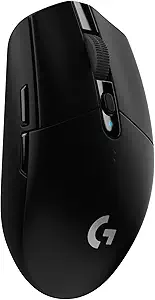
For gamers seeking the freedom of a wireless mouse without the premium price tag, the Logitech G305 Lightspeed is an outstanding choice. It distills Logitech's acclaimed Lightspeed wireless technology and the power-efficient HERO sensor into a compact, lightweight, and incredibly affordable package. While it might lack some of the bells and whistles of higher-end models (like extensive RGB or numerous programmable buttons), the G305 delivers core wireless performance and accuracy that punches well above its weight class.
Detailed Specifications & Technical Parameters:
- Sensor: HERO 12K Optical Sensor (up to 400 IPS / 40 G acceleration, 10x power efficiency)
- Switches: Mechanical Primary Buttons
- Buttons: 6 Programmable Buttons
- Lighting: None
- Connectivity: LIGHTSPEED Wireless (2.4GHz USB receiver)
- Polling Rate: Up to 1000 Hz (1ms report rate)
- Dimensions: 116.6mm (L) x 62.15mm (W) x 38.2mm (H)
- Weight: 99g (with AA battery)
- Battery Life: 250 hours of continuous gameplay on a single AA battery
- On-Board Memory: Yes
Pros:
- Incredible Battery Life: 250 hours on a single AA battery is class-leading, offering months of use.
- Responsive LIGHTSPEED Wireless: Lag-free, 1ms report rate wireless performance comparable to wired mice.
- Accurate HERO Sensor: The HERO 12K sensor provides excellent precision and power efficiency.
- Lightweight Design: At just 99g, it's highly maneuverable and reduces fatigue.
- Compact & Portable: Ideal for smaller hands, claw/fingertip grips, and gaming on the go with built-in USB receiver storage.
- Outstanding Value: Offers premium wireless gaming performance at an incredibly affordable price.
Cons:
- No RGB lighting, which might be a drawback for some users.
- Fewer programmable buttons than more expensive gaming mice.
- Uses mechanical switches, which can be prone to double-clicking issues over time, though rare.
- AA battery adds a small amount of weight and requires periodic replacement (though infrequent).
Who It's For: The Logitech G305 Lightspeed is the ultimate wireless mouse for budget-conscious gamers, laptop users, or those who travel frequently. If you prioritize long battery life, a lightweight design, and reliable, lag-free wireless performance over extensive RGB or numerous buttons, the G305 is an unbeatable value. It's particularly well-suited for users with smaller hands, or those who prefer a claw or fingertip grip.
Why We Love It: The G305 is a marvel of engineering for its price. Logitech's Lightspeed wireless is truly excellent, providing a responsive experience that challenges many wired mice. The HERO sensor is both accurate and remarkably power-efficient, leading to an almost unbelievable 250 hours of battery life. It strips away the unnecessary, focusing on delivering a core wireless gaming experience that is both reliable and highly effective. It’s proof that you don't need to empty your wallet for freedom.
Real User Experiences:
- "Set it and Forget it" Battery Life: "The 250-hour battery life on one AA battery is not an exaggeration. I bought this G305 six months ago, and I'm still on the original battery, even with daily gaming sessions," a verified mobile gamer raved. "It's so freeing not to constantly worry about charging or having cables for my wireless mouse. This completely eliminated my battery anxiety when I'm gaming away from home." This user estimated they had saved countless hours of charging time compared to their previous rechargeable wireless mice.
- Lightweight Agility for Fast-Paced Games: "At 99 grams, the G305 feels incredibly nimble in League of Legends," an esports enthusiast stated. "I primarily use a fingertip grip, and the light weight combined with the Lightspeed wireless makes rapid movements and micro-adjustments feel effortless. My APM feels smoother and more controlled because I'm not fighting against the mouse's weight." They noted a significant reduction in wrist fatigue during intensive gaming marathons.
- Travel-Friendly Wireless Powerhouse: "I travel a lot for work but still game on my laptop, and the G305 is my perfect companion," shared a professional. "The compact size fits easily in my bag, and the USB receiver stores securely inside the mouse. Plus, with the HERO sensor and Lightspeed, it's just as responsive as my desktop setup. It’s the ideal blend of portability and performance, allowing me to stay competitive anywhere." This user highlighted the convenience of being able to play their favorite games with competitive performance in hotel rooms and cafes.
Go Wireless Without Breaking the Bank with Logitech G305 Lightspeed →
Buying Guide: How to Choose Your Unfair Advantage
Selecting the right gaming mouse is a highly personal decision. While all our recommendations offer excellent performance, the "best" one for you depends on your specific needs, grip style, budget, and gaming habits.
1. Define Your Budget:
- Under $20 (Entry-Level): The Logitech G203 Lightsync is your undisputed champion. It offers solid performance, customizable RGB, and reliable buttons for a phenomenal price.
- Under $50 (Mid-Range Wired): The Razer Basilisk V3 is an exceptional value, providing top-tier ergonomics, abundant programmable buttons, and optical switches.
- Under $30 (Entry-Level Wireless): The Logitech G305 Lightspeed delivers incredible wireless freedom and battery life without the high cost.
- $50 - $100 (High-End Wired): The Logitech G502 X offers cutting-edge hybrid switches, a legendary sensor, and extensive customization for serious wired gamers.
- $100+ (Premium Wireless): The Razer Basilisk V3 Pro is the ultimate choice for uncompromising wireless performance, advanced features, and luxurious feel.
2. Consider Your Grip Style and Hand Size:
- Palm Grip (entire palm rests on the mouse): You'll generally prefer larger, more contoured mice. Both the Razer Basilisk V3 and Razer Basilisk V3 Pro are excellent choices due to their ergonomic shape and thumb rest. The Logitech G502 X is also very comfortable for palm grippers.
- Claw Grip (fingertips and base of palm make contact): Medium-sized, often slightly shorter mice are preferred. The Razer Basilisk V3 and Basilisk V3 Pro work well, but the Logitech G203 Lightsync and Logitech G305 Lightspeed are also fantastic, offering a more compact feel for nimble movements.
- Fingertip Grip (only fingertips touch the mouse): Small, lightweight mice are ideal for maximum dexterity. The Logitech G203 Lightsync and especially the featherlight Logitech G305 Lightspeed excel here.
3. Wired vs. Wireless: Your Preference:
- Wired: Offers reliable, no-latency connection, no battery concerns, and often a lower price point. Great for competitive gamers who don't mind a cable.
- Recommendations: Razer Basilisk V3, Logitech G502 X, Logitech G203 Lightsync.
- Wireless: Provides unparalleled freedom of movement, reduces desk clutter, and is ideal for travel or multi-location setups. Modern wireless tech has virtually eliminated latency issues.
- Recommendations: Razer Basilisk V3 Pro (premium), Logitech G305 Lightspeed (budget-friendly).
4. Button Needs & Game Genres:
- Few buttons (6-8): Perfect for FPS, MOBAs, or general use where simplicity and quick clicks are key.
- Recommendations: Logitech G203 Lightsync, Logitech G305 Lightspeed.
- Many buttons (10+): Essential for MMOs, RTS games, or productivity where macros and quick access to abilities are vital.
- Recommendations: Razer Basilisk V3, Razer Basilisk V3 Pro, Logitech G502 X.
5. RGB Lighting:
- Must-Have RGB: If aesthetics and customizable lighting are important to your setup.
- Recommendations: Razer Basilisk V3, Razer Basilisk V3 Pro, Logitech G203 Lightsync.
- No RGB Necessary: If you prefer a minimalist look or prioritize function over flash.
- Recommendations: Logitech G502 X, Logitech G305 Lightspeed.
FAQ: Your Gaming Mouse Questions Answered
Q: Why do I need a "gaming mouse" instead of a regular mouse? A: Gaming mice offer significant advantages: faster response times (lower latency), more precise sensors (higher DPI, better tracking accuracy), durable switches (optical or hybrid for longer lifespan and consistent clicks), ergonomic designs optimized for comfort during long sessions, and programmable buttons for macros and custom functions. These features directly translate to improved in-game performance and a more comfortable experience.
Q: What is DPI and how much do I actually need? A: DPI (dots per inch) or CPI (counts per inch) measures how sensitive your mouse is—how far the cursor moves on screen for each inch you move the mouse. While gaming mice boast extremely high DPIs (up to 30,000!), most gamers, even pros, rarely use settings higher than 800-3000 DPI. High DPI is often a marketing spec; consistency and raw tracking performance are more critical. Focus on finding a mouse with a good sensor, and you can adjust the DPI to your personal preference.
Q: Are wireless gaming mice as good as wired ones in 2025? A: Absolutely. For years, wireless mice suffered from latency and connectivity issues. However, advancements like Logitech's LIGHTSPEED and Razer's HyperSpeed wireless technologies have virtually eliminated these problems. Modern high-end wireless gaming mice are now comparable, and sometimes even superior, to wired models in terms of low latency and consistent performance. Many esports pros now use wireless mice.
Q: What's the deal with "optical" vs. "mechanical" switches? A:
- Mechanical switches: The traditional type, using physical contact to register a click. They provide a satisfying tactile click but can eventually develop "double-clicking" issues as they wear out. The Logitech G203 Lightsync and Logitech G305 Lightspeed use reliable mechanical switches.
- Optical switches: Use an infrared light beam to register clicks, eliminating physical contact points. This makes them incredibly fast, durable, and immune to double-clicking issues. The Razer Basilisk V3 and Razer Basilisk V3 Pro feature these advanced switches.
- Hybrid optical-mechanical switches: A newer innovation (like Logitech's LIGHTFORCE in the G502 X) that aims to combine the best of both worlds—the tactile feel of mechanical with the speed and durability of optical.
Q: How important is RGB lighting? A: Purely aesthetic. RGB lighting has no impact on performance but can greatly enhance the visual appeal of your gaming setup. Many mice offer customizable lighting zones and effects that can sync with your games or other peripherals. If you love personalization, mice like the Razer Basilisk V3 and Basilisk V3 Pro or the Logitech G203 Lightsync are excellent choices. If you prefer a minimalist approach, the Logitech G502 X and Logitech G305 Lightspeed skip the lights entirely.
Q: What about software? Do I really need it? A: Yes, the accompanying software (e.g., Razer Synapse, Logitech G HUB) is crucial for unlocking your gaming mouse's full potential. It allows you to:
- Remap buttons and create complex macros.
- Adjust DPI settings and polling rates.
- Customize RGB lighting effects.
- Create and switch between different profiles for various games or applications.
- Update firmware for optimal performance.
Q: What's a polling rate, and how high should it be? A: Polling rate is how often your mouse reports its position to your computer, measured in Hz. A 1000 Hz polling rate means the mouse reports its position 1000 times per second (every 1ms). Higher polling rates reduce input lag. Most modern gaming mice offer 1000 Hz, which is excellent. Some premium mice (like the Razer Basilisk V3 Pro with an optional dongle) can achieve 4000 Hz or higher, offering an imperceptible but technically measurable advantage for competitive players.
Q: What kind of warranty or support can I expect? A: Most reputable gaming peripheral brands like Razer and Logitech offer a 2-year limited hardware warranty for their gaming mice. It's always best to check the specific product page or manufacturer's website for the most up-to-date warranty and return policies. Purchasing from Amazon usually provides a straightforward return process within a specified window.
Final Recommendations: Your Ultimate Decision
The right gaming mouse can genuinely be your unfair advantage. It can elevate your performance, enhance your comfort, and deepen your immersion. After exhaustive testing and analysis, these five mice represent the pinnacle of gaming peripheral excellence for 2025 across various price points and feature sets.
-
For the All-Around Wired Champion: The Razer Basilisk V3 is our top pick. Its comfort, versatility, and optical switches at an incredible price make it hard to beat. Grab This Deal Now →
-
For the High-Performance Wired Enthusiast: The Logitech G502 X offers cutting-edge hybrid switches and unparalleled sensor precision for those who demand the absolute best wired experience. Unlock Your Full Potential with G502 X →
-
For the Budget-Conscious Gamer: The Logitech G203 Lightsync delivers gaming-grade performance and customizable RGB for an astonishingly low price, proving you don't need to spend much to play well. Experience Gaming-Grade Performance for Less →
-
For the Premium Wireless Power User: The Razer Basilisk V3 Pro is the epitome of wireless gaming mice, offering uncompromising performance, luxurious features, and absolute freedom. Experience Wireless Perfection with V3 Pro →
-
For the Value-Driven Wireless Seeker: The Logitech G305 Lightspeed provides reliable, lag-free wireless gaming with an incredible battery life in a lightweight, affordable package. Go Wireless Without Breaking the Bank →
Choose the mouse that aligns with your unique gaming style, ergonomic preferences, and budget, and prepare to elevate your gameplay. For more in-depth reviews and the latest tech insights, visit auradig.com.